UI and key in-game elements development for a mobile game: Trolls Pop – Treasure Hunt
2019-2020 - UI, UX, visual development
I worked on the DreamWorks-licensed mobile bubbleshooter game Trolls Pop as part of the game art team, focusing on UI asset creation and In-Game concepts. Collaborated with a Senior UI/UX Designer to support early UX exploration for new features, contributing to the layout and user flow discussions. Ensured visual consistency with the IP while aligning designs with gameplay and user needs.
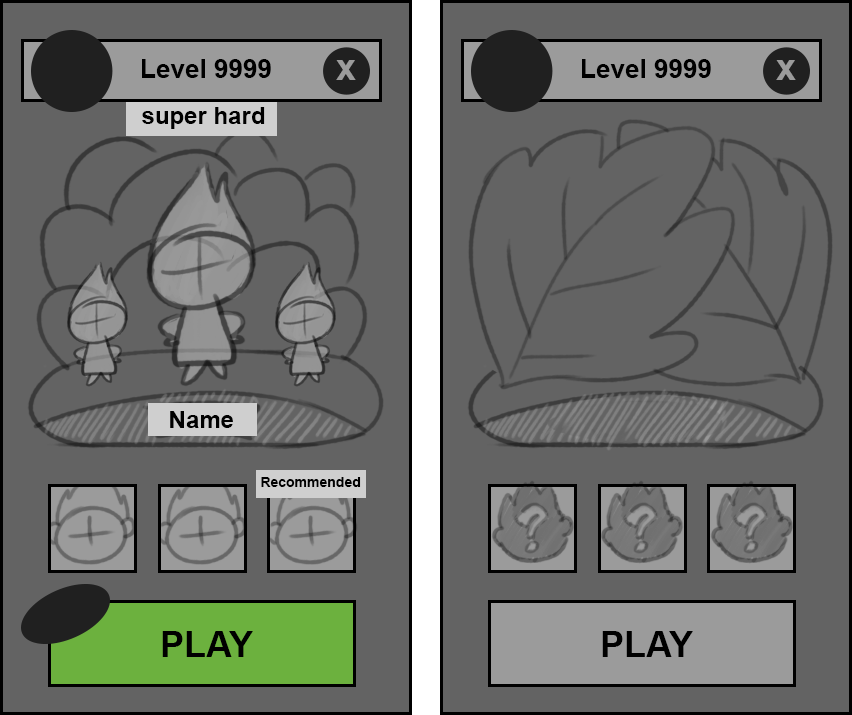
Pre-Game Screen – UX & UI Collaboration
Together with the Lead UX Designer, I worked on the layout and visual direction of the pre-game screen. Like many character-driven casual games, this screen needed to include character selection along with contextual information like level number and game mode. We aimed to match the colourful world of the movie while supporting player decision-making.
UI Icon & Asset Set
As part of the UI / UX team support , I created a series of simplified, flat-style icons and avatars for various features, navigation bar icons and a themed shop header.
Hazard concepts – visual development
I collaborated with the game designer and technical artist to concept the in-game hazard elements. I had the mechanic description that was prepared by the game designers and explored a direction inspired by the movie's vibrant environments and quirky characters, aiming to create cute but chaotic creatures that fit the DreamWorks Trolls universe. The hazards needed to be immediately readable and fun to interact with, while staying true to the playful, unpredictable tone of the IP.
In-Game Elements concepts: Bubbles
The key element in the game was a bubble, and I was researching the options, including not only the visual style, but also implementation and tech side, together with the tech artist.
I prepared a few concepts, and 3 of them included some relevant to the IP themed objects, which would also solve the accessibility problem (adding items inside the bubbles to differentiate them not only by colour), after reviewing the ideas, art director and other stakeholders made the decision to go with the simple colourful bubbles.
This approach required a smart tech setup in Unity engine, that would allow controlling their colour and effects right there, without replacing the assets in case of the iterations. I created the concept, tech artist wrote the shader for it and set up the system in unity, that I was then using to tweak the colours and effects.